Selecting Custom Fonts (Low Profile and Isurit Zahav)
Why Use This
To change the font style displayed on the secure payment page—font selection.
The update is performed by modifying CSS styling tags. A web designer/developer should be involved to make this change.
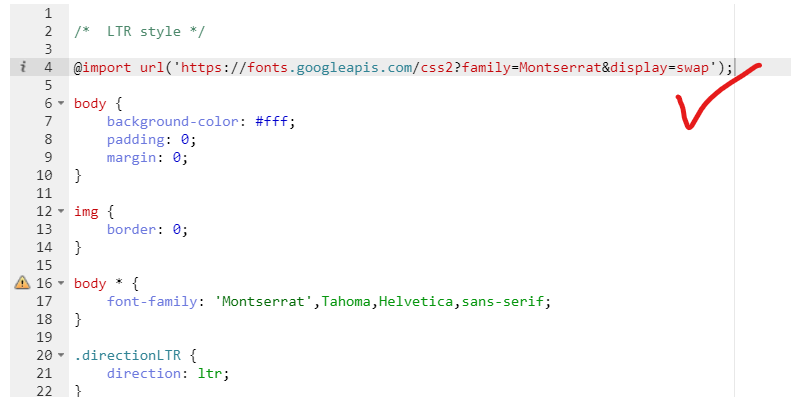
You can also import an external CSS source, but only for fonts from Google. See the explanation below.
How to Use This
Guide to updating fonts on the page (CSS) (external website)
For updating the CSS, see the following links:
CSS guide for your website (Low Profile)
CSS guide for Isurit Zahav payment pages
Font List
Cardcom Ltd. has securely stored fonts for use (available at an internal address).
For example:
https://secure.cardcom.solutions/Fonts/Alef-Bold.eot
Available for use:
Alef-Bold.eot
Alef-Bold.svg
Alef-Bold.ttf
Alef-Bold.woff
Alef-Regular.eot
Alef-Regular.svg
Alef-Regular.ttf
Alef-Regular.woff
carmela.eot
carmela.svg
carmela.ttf
carmela.woff
Ester_E_Bold.otf
Ester_E_Regular.otf
MarkSimonsonProximaNovaBold.otf
MarkSimonsonProximaNovaLight.otf
MarkSimonsonProximaNovaRegular.otf
OpenSansHebrew-Bold-ie.eot
OpenSansHebrew-Bold.eot
OpenSansHebrew-Bold.ttf
OpenSansHebrew-Bold.woff
OpenSansHebrew-Bold.woff2
OpenSansHebrew-Regular-ie.eot
OpenSansHebrew-Regular.eot
OpenSansHebrew-Regular.ttf
OpenSansHebrew-Regular.woff
OpenSansHebrew-Regular.woff2
OpenSansHebrewCondensed-Bold-ie.eot
OpenSansHebrewCondensed-Bold.eot
OpenSansHebrewCondensed-Bold.ttf
OpenSansHebrewCondensed-Bold.woff
OpenSansHebrewCondensed-Bold.woff2
OpenSansHebrewCondensed-Regular-ie.eot
OpenSansHebrewCondensed-Regular.eot
OpenSansHebrewCondensed-Regular.ttf
OpenSansHebrewCondensed-Regular.woff
OpenSansHebrewCondensed-Regular.woff2
GothamProBold\GothamProBold.eot
GothamProBold\GothamProBold.ttf
GothamProBold\GothamProBold.woff
GothamProRegular\GothamProRegular.eot
GothamProRegular\GothamProRegular.ttf
GothamProRegular\GothamProRegular.woff
Adding a Font Through Google:
You can also work with CSS sources that begin with the relevant src: https://fonts.googleapis.com
Attempts to update other sources will cause the changes not to be saved.
Example—